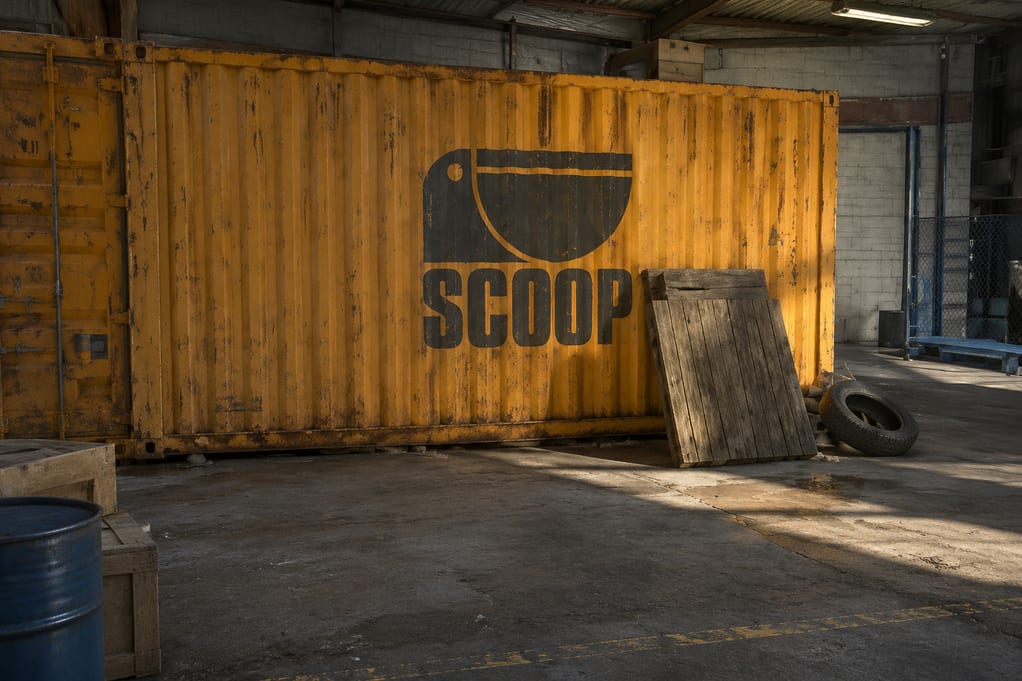
A locked yellow container with SCOOP lettering is easy to spot near Leonida’s cargo areas, but it cannot be opened until the story provides the right tool. The Cut-Off Tool becomes available during Chapter 3’s “Meet the Heders” mission. This guide separates that confirmed mission location from broader search areas, since available location reports do not establish a complete, verified list of every container.
For a GTA 6 Accounts exploration checklist, record containers by district rather than treating every map pin as confirmed. The yellow paint and SCOOP logo are useful visual clues; the lock interaction is the practical test. Contents vary, so one opened container does not tell you what the next one will hold.
The Confirmed Story Container
“Meet the Heders” sends Lucia to a dockyard in Port Vice City to open a specific SCOOP container. The Cut-Off Tool is used on its lock, and the container is tied to the mission’s vehicle objective. Nearby cargo containers are not interchangeable with the marked target, so follow the mission indicator rather than cutting open containers at random.
After completing the mission, keep an eye out for other yellow SCOOP containers while travelling. The tool’s story introduction establishes how to open them, but does not by itself confirm a complete map-wide inventory or a fixed reward at every location.
How to Identify and Open One
Look for a yellow container with SCOOP printed on its side or doors. Approach the door lock and check for the Cut-Off Tool prompt. If it does not appear, confirm that the story mission has been completed and move closer to the doors.
During the cutting interaction, follow the on-screen prompt. The mission sequence shows the tool being used to break the lock; control inputs may depend on platform and settings, so use the instructions displayed in-game.
Search Areas and Route Planning
Current community maps and guides show reported containers in areas including Key Lento, dockyards, roadside lots and spaces beneath elevated roads. Treat these as places to search, not a guaranteed list: reported map coverage differs, and a marker alone does not prove that a container is present at that exact spot.
| Search area | What to check | Confidence |
| Port Vice City dockyard | The marked stack during “Meet the Heders” and accessible lanes nearby | Confirmed mission area |
| Key Lento | Beach access roads, parking areas and cargo clusters | Reported search area |
| Roadside lots and underpasses | Side roads and spaces partly hidden from the main route | Reported search area |
| Areas near gang hideouts | Nearby lots and container stacks; watch for hostile activity | Reported search area |
A compact loop can reduce repeated driving:
- Complete “Meet the Heders” to obtain access to the Cut-Off Tool.
- Search the Port Vice City dockyard while the mission objective is active, then note the surrounding area for a later free-roam pass.
- Check nearby roadside clusters as part of the same trip instead of crossing the map for each possible container.
- Make a separate sweep through Key Lento, checking parking areas and beach access points.
- Track opened containers with a short district checklist. The open doors make completed stops easier to recognize.
Possible Finds Inside
Reported contents include weapons, explosives, drugs, cash, collectibles and vehicles. These are possible categories, not a guaranteed reward list; the contents of one container should not be assumed to predict another’s. The vehicle in the “Meet the Heders” objective is a mission-specific find, not proof that every SCOOP container contains a vehicle.
When planning a longer sweep, group container searches with nearby activities and keep an eye on your in-game spending. If buy GTA VI Money is part of your broader resource plan, treat it as separate from locating containers: the SCOOP search itself still depends on finding the marked cargo and using the Cut-Off Tool.
The firmest starting point is the Port Vice City dockyard mission objective. For containers beyond it, use the SCOOP marking to verify each find and keep reported map pins distinct from locations confirmed in your own game.